
RSVP Management
Smart RSVP management — know exactly who's coming before the event
Actiolife's RSVP system sends branded invitations via email and SMS, collects responses on a personalized event page, and gives you a live dashboard to act on every response — or non-response.
How most organizers still manage RSVPs
Phone calls and spreadsheets
Calling guests one by one. Writing responses in Excel. Losing track of who said what. Rechecking before the event.
Email with no tracking
Sending a generic email and waiting. No idea who opened it, who ignored it, or whose address bounced.
Last-minute surprises
Catering ordered for 200. 340 people show up. Or the opposite. Both are expensive.
From invitation to confirmed headcount — automated
Create your RSVP campaign
Define event details — name, date, location, theme — set the response deadline, and configure automatic reminders. Assign companion allowances per guest and pick delivery channels: email, SMS, or both.
Guest receives personalized invitation
Each guest receives a unique secure link that opens their personal event page — branded with your logo and visuals — showing date, location, navigation, and Add to Calendar / Apple Wallet buttons. Details come pre-filled.
Guest confirms or declines
At the bottom of the page: 'Will you attend?' — Yes or No. If Yes and the guest has companion allowance, they enter each companion's name, email, phone, company, and title. They can change their answer anytime.
Organizer acts on live data
Your dashboard updates in real time. Filter by Confirmed, Declined, No Response, Email Bounced, or Not Opened. Send a follow-up campaign with one click, or export the full list — companions included — as Excel or CSV.
What your guest sees
The guest opens a page that feels like it belongs to your event — not a generic form. Your logo, your event photo, the venue name with a tap-to-navigate button, the date with an Add to Calendar button, and an Apple Wallet / Google Pass button. Below all of this: a single clear question and two buttons. On desktop the layout expands to full width. On mobile it's optimized for one-thumb interaction.
The same page also serves as the digital invitation. Guests can bookmark it, share it, and return to it anytime. Navigation, calendar, and wallet integrations are always one tap away.
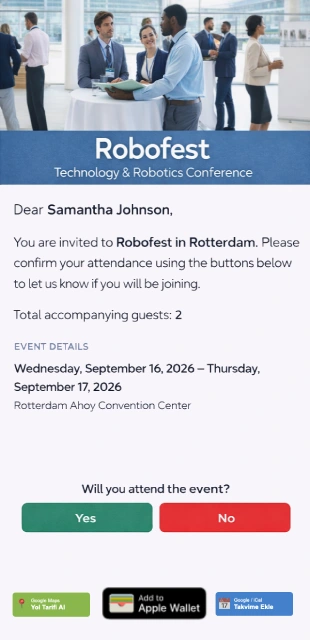
Guest invitation page
Companions: tracked, registered, accounted for
Some guests are allowed to bring companions. You define the allowance per guest — how many companions each person may register. When a guest confirms attendance, they enter each companion's details: full name, email, phone number, company, and title. Each companion becomes a separate guest record in the system, linked to the inviting guest via a parent ID. In your reports, companions appear indented under their inviting guest — so you always know who brought whom.
Your live control center
Real-time response tracking
See confirmed, declined, and pending counts update as guests respond.
Segment and filter
Filter by: Confirmed / Declined / No Response / Email Not Opened / Email Bounced.
One-click follow-up campaigns
Select any filtered group and send a new email or SMS campaign directly from the dashboard.
Excel / CSV export
Export the full guest list with RSVP status, companion details, and all custom fields.
Guest-level detail
Click any guest to see their full history: delivery status, open time, response, companions.
Where RSVP is going
Session & sub-event registration
Guests choose which sessions, workshops, or parallel tracks they'll attend — within the same RSVP flow.
Accommodation & preference selection
For multi-day events: room type, hotel, transfer preference — all collected at RSVP time.
Sub-event ticketing
Paid or free add-ons attached to the main event — dinner, gala, workshop — purchasable during RSVP.
Related features
Stop guessing. Start knowing.
See how Actiolife RSVP works for your next event.